# Integrations

UBuild comes with some pre-made integrations with other apps like Unity & Postman.

# Unity Package

There is a Unity Package provided with UBuild that you can import directly into your project.

This package uses the UBuild API to remotely modify builds, add them to the queue and get *real-time* information from the UBuild app.

You can simply import the provided .unitypackage file into Unity and you will be able to remotely access UBuild from Unity!

<p class="callout warning">Be sure to check "*UBuild/UBuildVariables.cs*" as you can change the access token and UBuild API endpoint here.</p>

## Getting information

You can retrieve information from this package by using the "UBuild" menu item at the top of Unity.

[![image.png](https://docs.publiczeus.com/uploads/images/gallery/2024-06/scaled-1680-/37EbUDYGML1n3kpx-image.png)](https://docs.publiczeus.com/uploads/images/gallery/2024-06/37EbUDYGML1n3kpx-image.png)
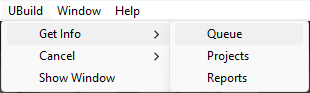
##### Here you can check:

- Currently queued builds: This will print each queued build into the Unity Editor console,
- Projects currently loaded: This will print each Project currently loaded in UBuild into the Unity Editor console.
- UBuild Reports: This will print each UBuild Report currently stored into the Unity Editor console.

## Sending information

You can send information to UBuild either by using the "UBuild" menu item at the top of Unity or by using the UBuild window.

#### Cancel menu

[![image.png](https://docs.publiczeus.com/uploads/images/gallery/2024-06/scaled-1680-/ds7P5ODKZpHcODIJ-image.png)](https://docs.publiczeus.com/uploads/images/gallery/2024-06/ds7P5ODKZpHcODIJ-image.png)
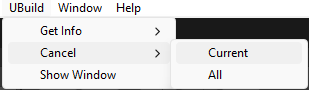
##### Here you can send a:

- Request to cancel the current build.
- Request to cancel all queued builds.

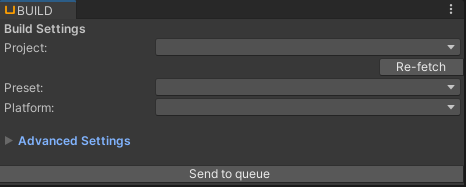
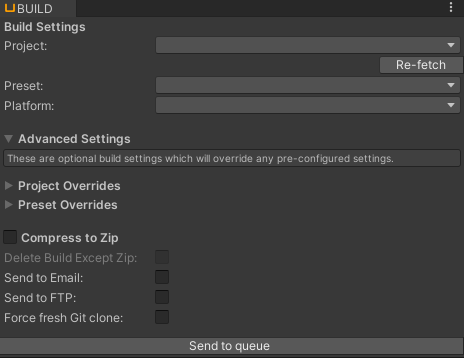
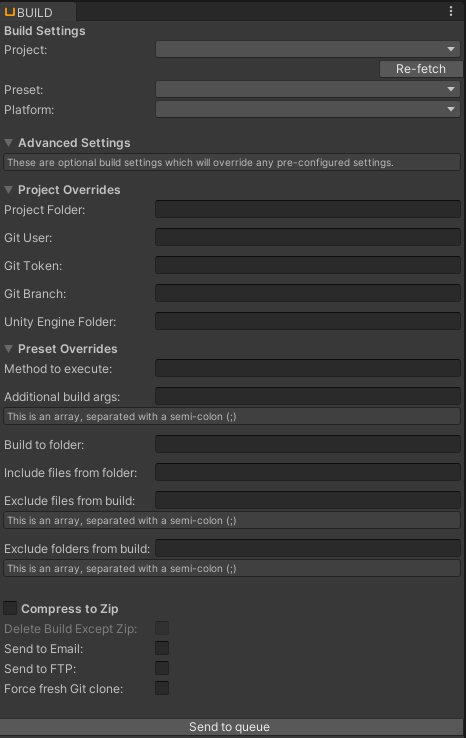
#### UBuild Window

<table border="1" id="bkmrk--2" style="border-collapse: collapse; width: 100%;"><colgroup><col style="width: 33.3333%;"></col><col style="width: 33.3333%;"></col><col style="width: 33.3333%;"></col></colgroup><tbody><tr><td>[![image.png](https://docs.publiczeus.com/uploads/images/gallery/2024-06/scaled-1680-/mYHjMEBkv9Or8eOj-image.png)](https://docs.publiczeus.com/uploads/images/gallery/2024-06/mYHjMEBkv9Or8eOj-image.png)

</td><td>[![image.png](https://docs.publiczeus.com/uploads/images/gallery/2024-06/scaled-1680-/PdtXB9qvtPGJRzm5-image.png)](https://docs.publiczeus.com/uploads/images/gallery/2024-06/PdtXB9qvtPGJRzm5-image.png)

</td><td>[![image.png](https://docs.publiczeus.com/uploads/images/gallery/2024-06/scaled-1680-/gCiashWUxirVJxXQ-image.png)](https://docs.publiczeus.com/uploads/images/gallery/2024-06/gCiashWUxirVJxXQ-image.png)</td></tr></tbody></table>

##### Here you can:

- Send a build to the queue.
- Remotely view all currently loaded projects/presets/platforms in the dropdowns.
- Chance advanced settings like FTP upload, Email notification etc "on the fly".
- Set advanced build overrides before sending a build to the queue.

# Postman collection

Provided with UBuild is a basic postman collection including all the available UBuild API methods. *(you can read more about the API [here](https://docs.publiczeus.com/books/getting-started-with-ubuild/chapter/api "API"))*